



Описание товара
Global Chat
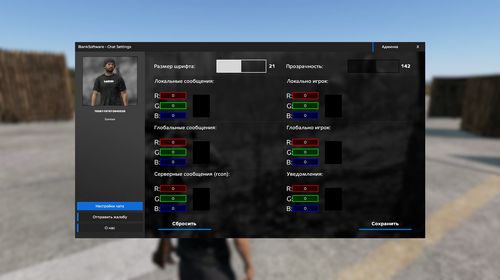
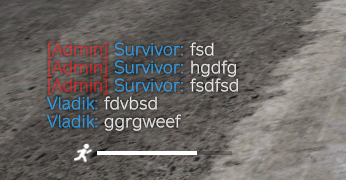
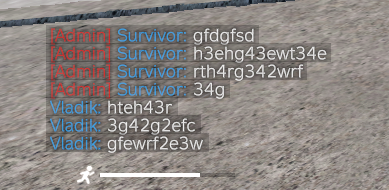
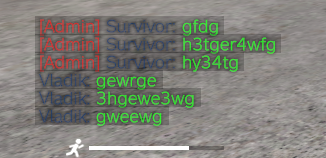
Мод Global Chat — добавит на ваш сервер расширенную систему чата с дополнительными функциями.
? Основные функции:
- Глобальный чат: Добавьте на ваш сервер глобальный чат между игроками.
- CustomSpawnPlayer: Используйте модификацию на сеты, дабы выделить всех игроков добавленных в список (чтобы не добавлять в ручную).
- Радио-чат: Включите требования наличия передатчика для использования глобального чата.
-
Роли: Укажите роли для игроков.
- Теги ролей: Добавьте для ваших ролей теги перед никнеймом (функционально).
- Иконки ролей: Добавьте для ваших ролей иконки перед тегом (функционально).
- Окрасьте иконку: Вы можете окрасить иконку либо оставить её того цвета, которым она являлась (функционально).
- Окрасьте никнейм: Вы можете окрасить никнейм игрока, н.п. можно убрать теги и оставить только цветные никнеймы (функционально).
- Участники: Добавьте неограниченное количество участников для ролей.
- Цвет: Укажите цвет роли в формате R G B.
- Настройте другие цвета — Вы можете настроить цвета:
- Локально: Настройте цвет локальных сообщений и никнейма игрока.
- Глобально: Настройте цвет глобальных сообщений и никнейма игрока.
- Сервер: Настройте цвет серверных сообщений.
- Уведомления: Настройте цвет уведомлений.
- GUI Меню: Меню для настройки чата для игроков.
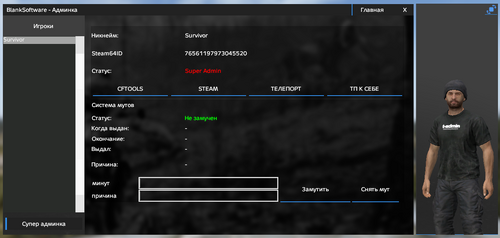
- Система мутов: Админ меню для выдачи мутов игрокам на время (или навсегда).
-
Система автоматической модерации чата: Указываете запрещенные слова (словосочетания) и игрок при неоднократном нарушении получит мут на определенное время.
# Меню настроек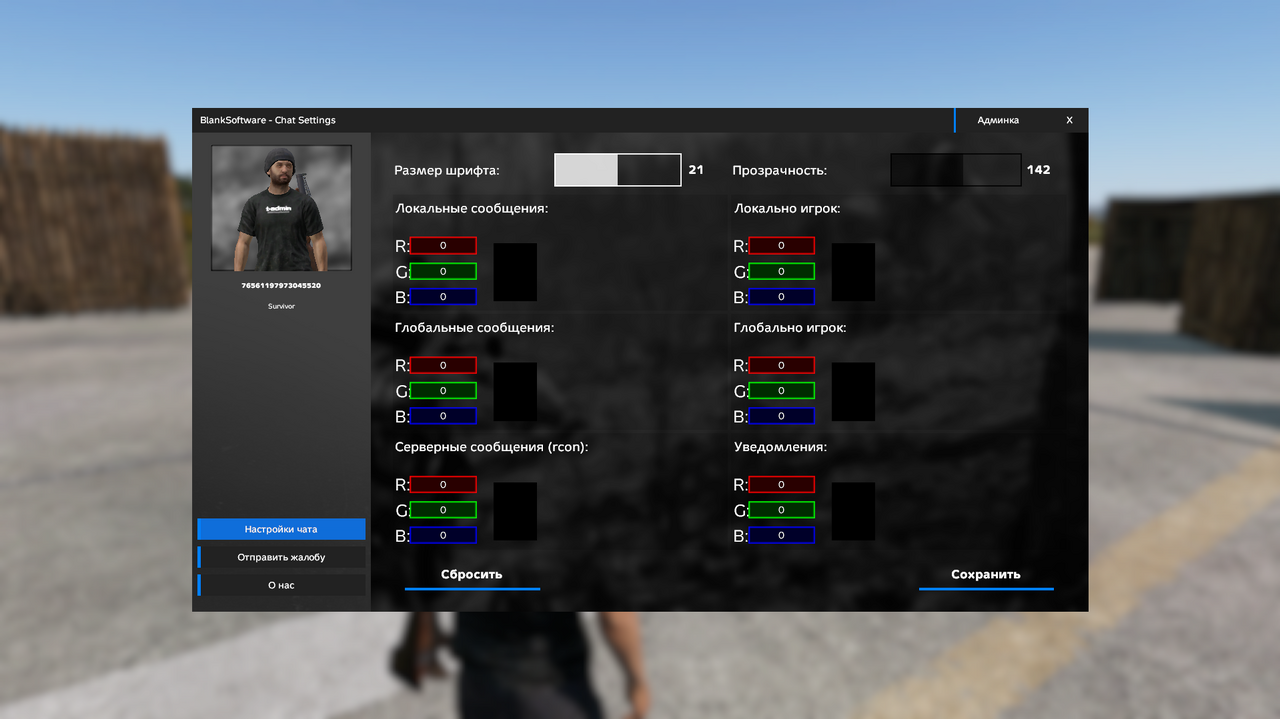
# Чат с различными настройками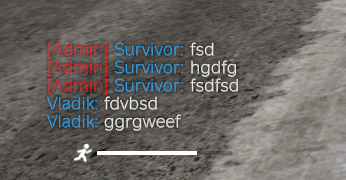
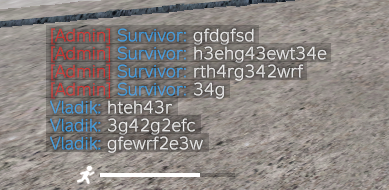
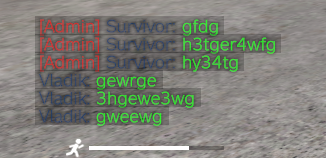
# Мут система
Система выдачи мута (блокировка возможности писать в глобальный чат) для игроков основана на выдаче мута админом либо автономный вариант - выдача системой модерации (об этом читайте ниже).
Время блокировки указывается в формате UTC.
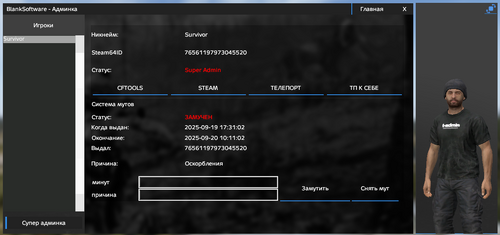
# Мут система - Админ меню
Меню интегрировано в наш Client Core.
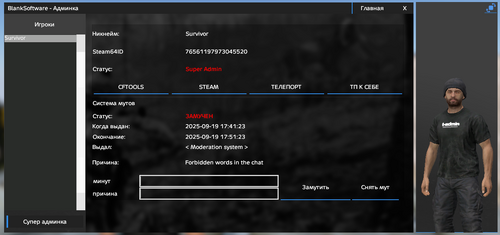
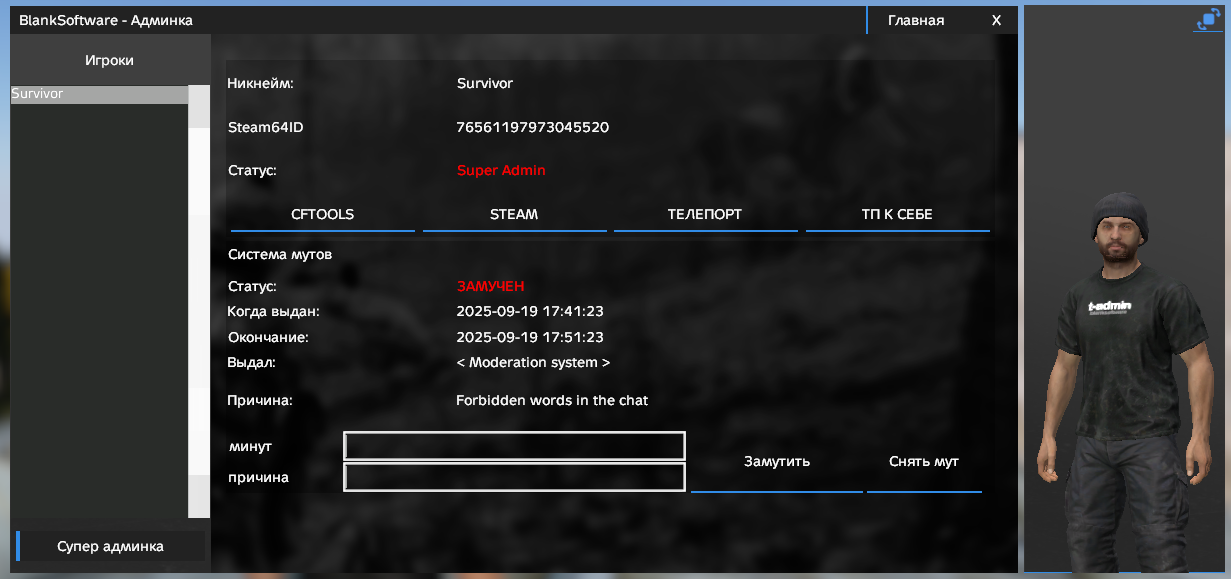
У админов появляется отдельная вкладка "Система мутов"
Там можно обнаружить пункты:
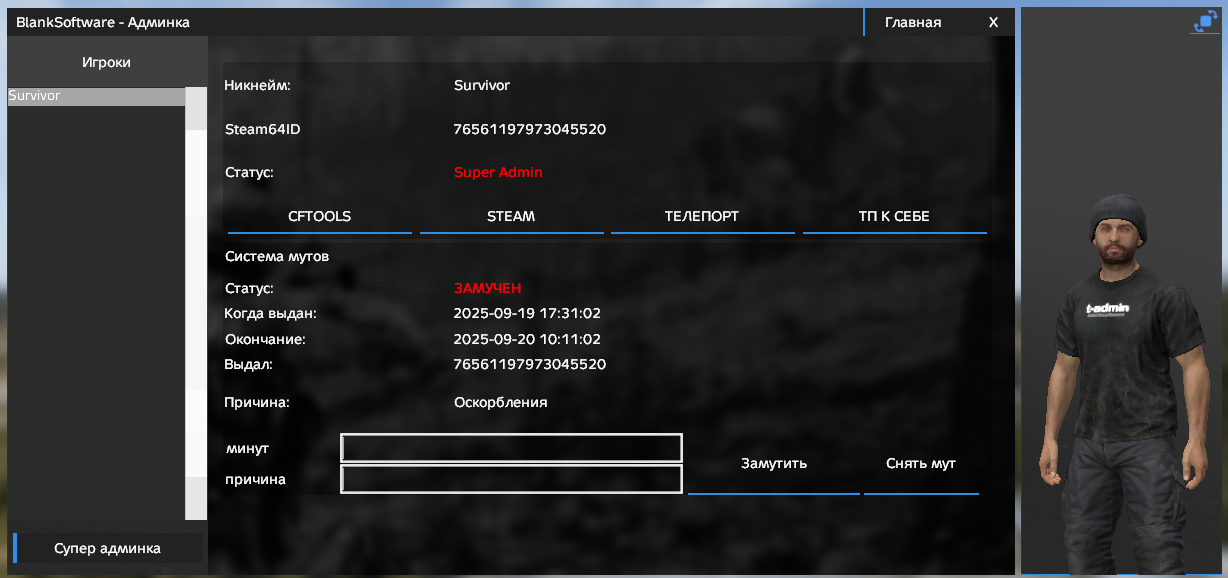
- Статус - в мут/ не замучет
- Когда выдан - когда выдали игроку мут
- Окончание - когда окончится мут игрока
- Выдал - steam64id админа который выдал ЛИБО < moderation system > что означает что мут выдан был системой модерации
- Причина - причина мута которую указал админ (либо система модерации)
Включает так-же в себя поле для ввода кол-ва минут для мута и причины мута, а также две кнопку выдать и снять мут.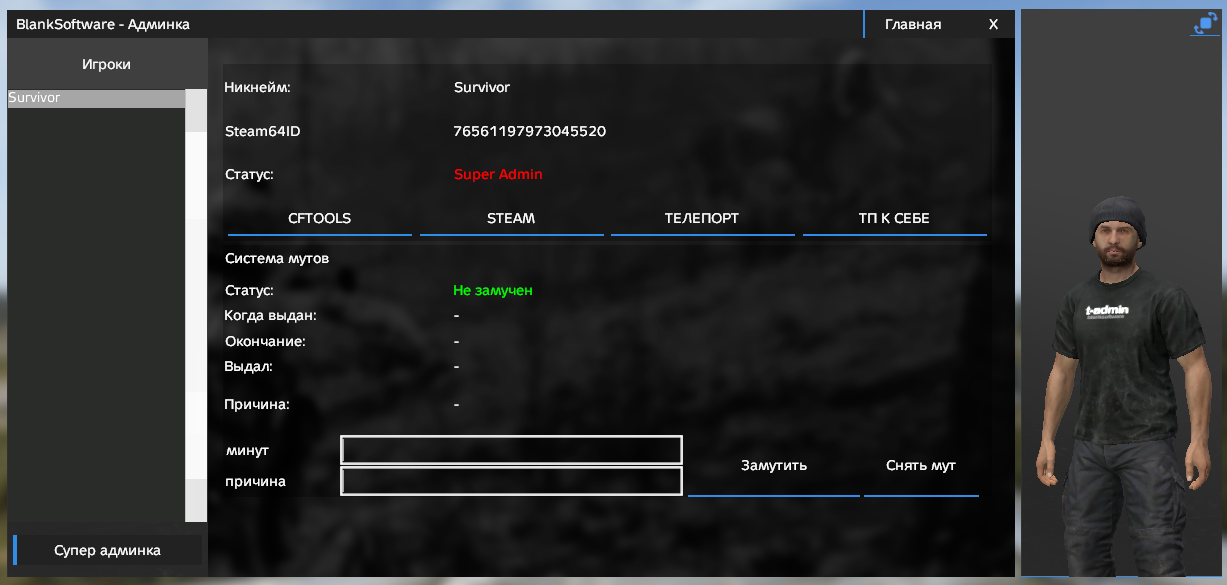
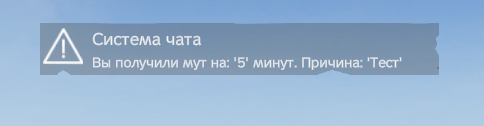
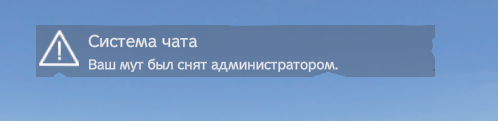
# Мут система - Уведомления
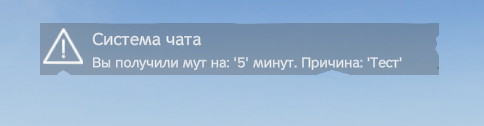
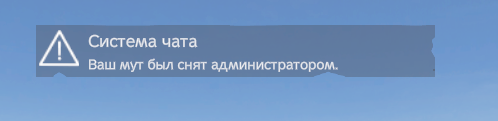
Какие уведомления присутствуют?
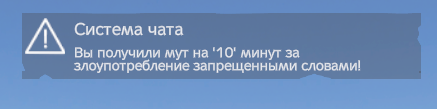
- Уведомления при выдаче/снятии мута.
- Уведомления при перезаходе на сервер о состоянии мута.
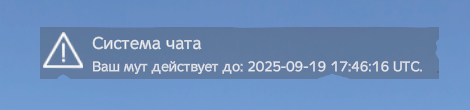
- Уведомление в чат при попытке написать когда на вас действует мут.
- Всеобщее уведомление если кому-то выдали мут (опционально).
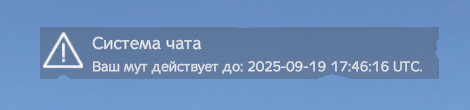


# Система модерации
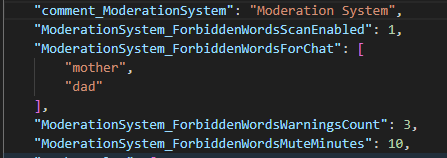
Система представляет собой список запрещенных слов указываемых в чате.
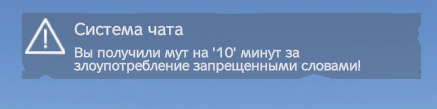
Если игрок пишет запрещенные слова либо словосочетания сообщение не отправляется в глобальный чат, а так-же игрок получает предупреждение, если игрок набирает определенное кол-во предупреждений ему выдается мут на время указанное в конфиге.
p.s. на последнем скриншоте показано как выглядит состояние мута в админ-меню.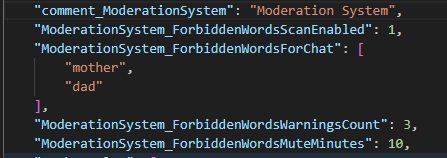

Global Chat
Global Chat mod — adds an extended chat system with additional functions to your server.
? Main functions:
- Global Chat: Add a global chat between players to your server.
- CustomSpawnPlayer: Use the modification on the sets in order to highlight all the players added to the list (so as not to add manually).
- Radio Chat: Enable the requirements of having a transmitter to use the global chat.
-
Roles: Specify the roles for the players.
- Role tags: Add tags before the nickname for your roles (functionally).
- Role Icons: Add icons for your roles before the tag (functionally).
- Color the icon: You can color the icon or leave it the color it was (functionally).
- Color the nickname: You can color the nickname of the player, n.p. you can remove the tags and leave only the colored nicknames (functionally).
- Participants: Add an unlimited number of participants for roles.
- Color: Specify the color of the role in the R G B format.
- Customize other colors — You can customize the colors:
- Locally: Customize the color of the local messages and the player's nickname.
- Globally: Customize the color of the global messages and the player's nickname.
- Server: Set the color of the server messages.
- Notifications: Adjust the notification color.
- GUI Menu: A menu for setting up a chat for players.
- Mutation System: Admin menu for giving mutations to players for a while (or forever).
- Automatic chat moderation system: Specify prohibited words (phrases) and the player will receive a mutation for a certain time in case of repeated violations.
# Settings Menu
# Chat with different settings
# Mute system
The muta issuance system (blocking the ability to write to a global chat) for players is based on the issuance of muta by the administrator, or an offline option is the issuance of a moderation system (read about this below).
The blocking time is specified in UTC format.
# Mute system - Admin menu
The menu is integrated into our Client Core.
Admins have a separate "Mutation System" tab
Where you can find the following items:
The status is in the mut/ will not be taken into account
When issued - when the mutation was issued to the player
Ending - when the player's mutation ends
Issued - steam64id of the admin who issued EITHER <moderation system >, which means that the mutation was issued by the moderation system
The reason is the reason for the mutation that the admin specified (or the moderation system)
It also includes a field for entering the number of minutes for the muta and the reason for the muta, as well as two buttons to issue and remove the muta.
# Mute system - Notifications
What notifications are present?
- Notifications when issuing/withdrawing a muta.
- Notifications when logging in to the server about the mutation status.
- Notification in the chat when you try to write when you are affected by mutation.
Universal notification if someone has been issued a mutation (optional).
# Moderation system
The system is a list of forbidden words specified in the chat.
If a player writes forbidden words or phrases, the message is not sent to the global chat, and the player receives a warning if the player types a certain number of warnings, he is given a mutation for the time specified in the config.
p.s. the last screenshot shows what the muta state looks like in the admin menu.
Тип
Совместимая версия
Согласие с Условиями торговой площадки
Условия использования
Правила использования модификации (далее мод?
- Запрещено монетизация/передача/перепродажа другим лицам.
- Запрещено публиковать мод вне своего мод пака (отдельной публикацией в Steam Workshop).
- Запрещено изменять исходный код модификации.
- Запрещено перезагружать этот мод на другие площадки, право за перезагрузку остаётся только ЗА мной.
- Запрещено загружать серверный мод куда-либо помимо папки с серверными модами вашего проекта (БЕЗ ПУБЛИКАЦИИ В Steamworkshop и тому подобное).
- Покупатель после покупки покупатель получает полную поддержку мода.
- Покупатель вправе использовать модификацию на неограниченном количестве серверов от одного проекта (одно название) владелец коим и является.
-
Передача прав на использование (в случае закрытия проекта/его перепродажи и тп) происходит путём согласования сторон (покупателя/продавца т.е. меня).
подробнее: https://blanksoftware.tech/agreement/#user-agreement
Rules for using the modification (hereinafter referred to as the mod):
- Monetization/transfer/resale to other persons is prohibited.
- It is forbidden to publish a mod outside of your mod pack (by a separate publication in Steam Workshop).
- It is forbidden to change the source code of the modification.
- It is forbidden to reload this mod to other sites, the right to reload remains solely with me.
- It is forbidden to upload a server mod anywhere other than the folder with the server mods of your project (WITHOUT PUBLISHING IT IN Steamworkshop and the like).
- The buyer receives full mod support after purchase.
- The buyer has the right to use the modification on an unlimited number of servers from one project (one name), the owner of which is.
-
The transfer of rights to use (in case of closure of the project / its resale, etc.) takes place by agreement of the parties (buyer / seller, i.e. me).
more detailed: https://blanksoftware.tech/agreement/#user-agreement
Действия после покупки
Внимание!
После покупки вам необходимо будет выбрать вариант выдачи:
1. Через тикет Discord
2. Через сообщения в Telegram
Вариант №1:
- Присоединяемся к моему Discord: https://discord.gg/G9QgchMr9B
- Создаем тикет в специальном канале (нажав кнопку 'Покупка | Buy')
- Сообщить туда данные согласно анкете:
- Ваш steam64id
- Наименование вашего проекта
- Постоянная ссылка приглашение на дискорд вашего сервера (если есть)
- Доказательства покупки модификации и её название (с платформы s-platoon.ru)
- Ожидать подтверждения покупки.
Вариант №2:
- Переходим в мой телеграмм: https://t.me/blankdayz
- Сообщаем туда данные согласно анкете из варианта №1.
- Ожидаем подтверждения покупки.
Ссылка на наш веб-сайт: blanksoftware.tech
Warning!
After the purchase, you will need to select the issue option.:
1. Via the Discord ticket
2. Via Telegram messages
Option #1:
- Join my Discord: https://discord.gg/G9QgchMr9B
- Create a ticket in a special channel (by clicking the 'Buy| button')
- Provide the data according to the questionnaire:
- Your steam64id
- The name of your project
- Permanent invitation link to your server's discord (if available)
- Proof of purchase of the modification and its name (from the platform s-platoon.ru )
- Wait for purchase confirmation.
Option #2:
- Go to my telegram: https://t.me/blankdayz
- We provide the data there according to the questionnaire from option No. 1.
- Awaiting purchase confirmation.
Link to our website: blanksoftware.tech

.thumb.png.2e1056330c6d9db4e8db27d033c5c40e.png)